PAD360 for windows and doors

Every window order, from survey to signed off

PAD360 shows every order on every job: surveyed, ordered from the factory, delivered, fitted. Your fitters update it from site, so the office always knows.

Sound familiar?

Factory lead times catch you outThe order went in a week late, so the install date moves and the builder isn't happy.
Which flats are done?On a block of flats, nobody's sure which units are fitted, sealed and ready, until someone walks round.
Snags get lostThe builder's snag list is an email, a photo and a phone call, and half of it gets forgotten.

How a window job runs in PAD360

SurveyDwg out for ApprovalApprovedMaterials OrderedDeliveredInstall CompleteHanded over
  1. Add the job's orders as lines: one per elevation, block or flat, whatever suits you.
  2. Type in the date the builder needs them in. PAD360 works back to when they have to be ordered from the factory.
  3. Fitters add a quick Update from their phone: delivered, fitted, sealed, snagged.
  4. The office sees every job on one page and knows exactly what to tell the builder.
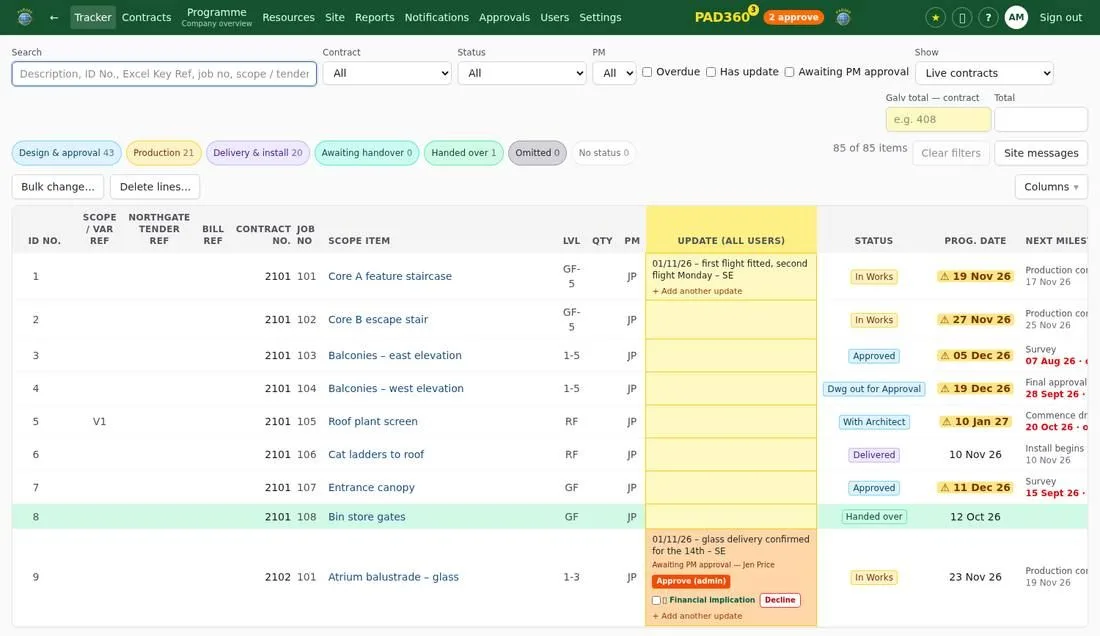
The PAD360 tracker: every line of every job with its status, dates and latest update

From £29 a month

Start the free trial See the packages

Questions

We're a small firm. Is it too much?

No. The Foundation package is £29 a month for up to 3 users and 5 jobs on the go, and you can switch off anything you don't need.

Can I change the status names?

Yes. You can name your stages and numbers the way your firm already works.

How long does it take to set up?

Most firms add their first job in under an hour. The free trial comes with a made-up example job to try first.