PAD360 for architectural metalwork

Every balustrade, stair and handrail, from drawings to handover

PAD360 puts every item on every job on one live page: where the drawings are, what's in the works, what's on site and what's next. Your fitters update it from their phones.

Sound familiar?

Drawings stuck with the architectNobody's sure which items are still waiting for approval, so fabrication starts late and the install date slips.
The programme lives in one person's headThe client's dates move, and working back to when the steel must be ordered is done on a calculator, if at all.
Ringing site for an updateThe office rings the fitters, the fitters ring the office, and the main contractor rings everyone.

How a metalwork job runs in PAD360

Dwg out for ApprovalApprovedFab dwgsMaterials OrderedIn WorksDeliveredInstall CompleteHanded over
  1. Add the job's items once: each balustrade, stair and handrail as a line, with its level and value.
  2. Type in the client's programme date. PAD360 works back to when drawings, materials and fabrication have to be done, and flags anything running late.
  3. Fitters add an Update from their phone on site. The project manager approves it and it goes on the line's history.
  4. Everyone sees the same live tracker and programme, and the QS sees the money: rates, variations and a cash flow forecast.
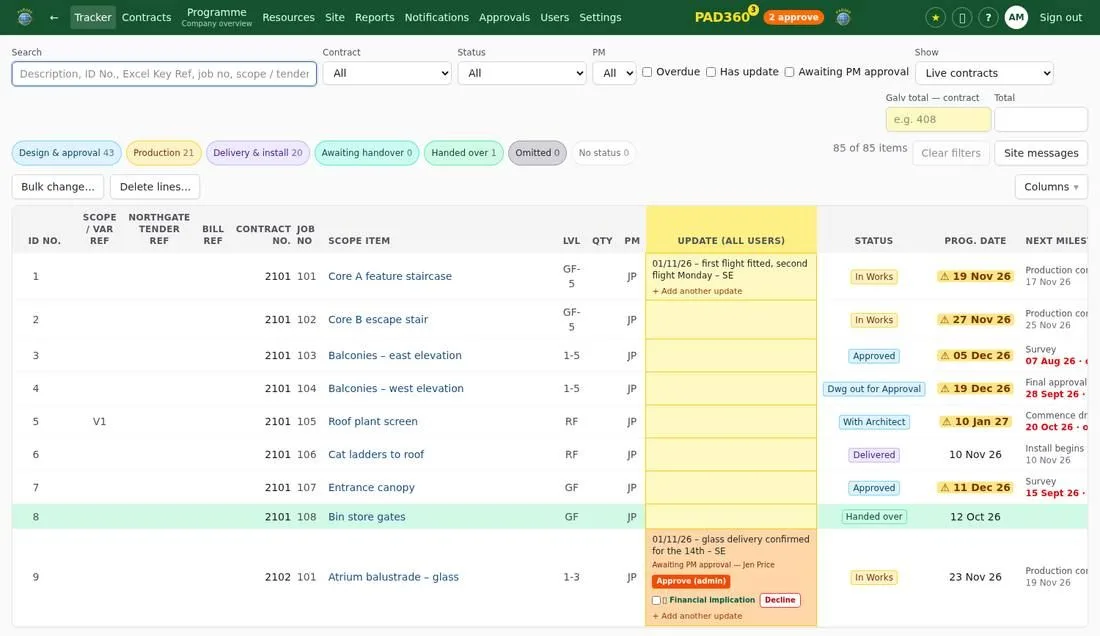
The PAD360 tracker: every line of every job with its status, dates and latest update

From £29 a month

Start the free trial See the packages

Questions

Does it work for small metalwork firms?

Yes. The Foundation package is £29 a month for up to 3 users and 5 jobs on the go. Bigger firms add users and modules as they need them.

Do my fitters need to install an app?

No. PAD360 opens in the phone's web browser and can be added to the home screen like an app. Nothing to install.

Can I send the client a Scope of Works?

Yes. Every job has a Scope of Works you can export to Excel or PDF, hiding any columns you don't want the client to see.